
- "Just downloaded this program after looking around for a good program. WOW this was easy. You just have to know a little about computers (aka look in the root folder and do this...) and it was so simple. iTunes has nothing on this. So simple, so quick, so convenient, and it's FREE- WHAT'S NOT TO LOVE?! THANK YOU for a great product- I will definitely use this company again! "Chris - Arkansas, USA, Aug 25, 2010
- "Thanks! It helped me use my ipod as a flash drive so I could format my computer and keep important files :)"Dylan - his PC, Aug 15, 2010
- "This application was a life-saver. I've been wondering forever how I'm going to get voice memos off my iPhone when iTunes sync function keeps crashing, but you guys fixed all that. The program was easy to install and easy to use. Thanks guys."Frank - Vancouver, BC., Aug 12, 2010
- "Just downloaded this app and it is great! A great alternative to Transmit for when a USB connection is possible. Super fast and easy to download."Greg - Reading, MA, Aug 03, 2010
- "Wow! I bought a dirt cheap iPod Touch G1 from an auction site intending to use it as a music player only because it had no wifi. But then I discovered IPhone Explorer and I can now place files directly onto the iPod through the USB connection. Simple and easy... no wifi needed! I'll be reading my favorite ebook tonight! Thank you Macroplant."Gregory Schneck - USA, Jul 24, 2010
100% Freeware!iPhone Explorer is 100% free, fully functional and not bundled with lots of crappy toolbars or other stuff to messup your computer. If you like iPhone Explorer and insist on paying us for it, checkout our store and maybe buy the full version of one of our other programs. |
Works on Mac OSX & Windows!This program was built from the ground up twice: first for Windows, then for Mac OS. It's a native program to each of those operating systems so it won't be ugly, buggy or laggy like some programs that are quickly ported over. It works on Mac OSX 10.5 and OSX 10.6, and it'll run on Windows XP, Vista or 7. It works with both 32 and 64 bit systems. |
Works with or without jailbreaking!iPhone Explorer hacks into your iPhone so you don't have to break it. We've figured out ways to control the iPhone even better than iTunes, and the best part is, all you need to do is plug any iPhone, iTouch or iPad into the computer. |
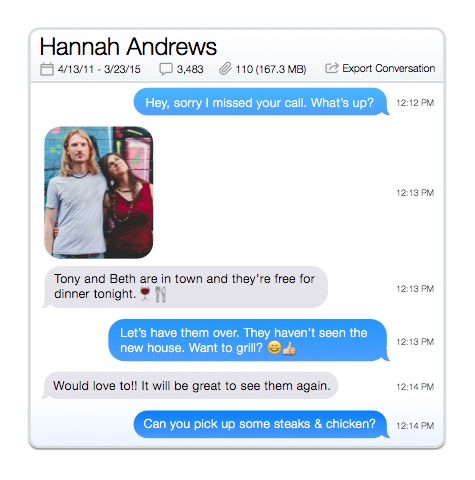
Modify files & folders on iPhoneCreate, delete and rename files and folders on your iPhone or iPod Touch Works with all iPhones & moreWorks with all iPhones, iPod Touches, and iPads including the iPhone 4. Every firmware from version 2.0 to version 4 or later should work so you won't even need to update your device. E-mail, SMS, voicemail, address book access!(Optional) If you jailbreak your iPhone you can access the real root of your iPhone and recover your address book, SMS, e-mails and more. |
USB iPhone Disk Mode (Use an iPhone as a Thumb or Pen Drive)Allows you to use your iPhone as a flash drive / pen drive or put your iPhone into disk mode View Pictures and PhotosIf you've taken pictures with your iPhone's camera and want to view them without using any of Apple's software, iPhone Explorer lets you preview and transfer all image files directly from the device. Drag and Drop InterfaceCopy files to and from your iPhone, iPad or iTouch using a simple drag and drop interface. |
Preview Files Before TransferringTrying to find a particular image on your device, but don't want to transfer your entire Photo Album? iPhone Explorer lets you preview your files directly within its program. Tiny DownloadiPhone Explorer is a tiny program that won't clutter or slow down your computer. Automatic UpgradesWith constant iPad, iPod and iPhone upgrades, iPhone Explorer is updated quite frequently to keep up with Apple and also to add new features and bug fixes. |
Mac Requirements:
|
iPod Compatibility:
|
![]() |
![]() |
![]() |
| Visit our support page by clicking here. Or e-mail us at support@macroplant.com and we’ll get back to you shortly. We check our e-mail 7 days a week, so you can expect a response within 24 hours (but many times much faster). | If you’ve got an iPod and iTunes, then you’re good to go! | If you’ve got a Mac, you’ll probably be interested in Dupe Away! It’s our iTunes Library cleaner for Mac. |


