
- "Thank goodness I found this, mac was stolen but now i have saved music from phone! easy to use."Lara - Kent, Dec 04, 2012
- "I am clueless with computers. This program was so easy. In five minutes I had a 17 page printout of texts rather than having to take a jillion screen shots.
Thank you!"W - US, Aug 22, 2012
- "I've used Macs since 1984, and have used countless third-party apps. This is by far the BEST app I've run across. Totally easy to download, install, interface with, and I have NEVER had an app do its job so quickly and simply. I'm thrilled. Bought it to recover 32 GB music off an old iPod. Had to do it in stages since the iPod battery wouldn't hold a charge for long, but the track numbering made it simple to find where to start again.
Please make more, equivalently golden-easy/effective, software!
*loud applause* !!!
and Thanks!!"Michele - Berkeley, Aug 21, 2012
- "This is amazing. I have tried many softwares to help transfer my music from my ipod to my itunes, but none of them were as awesome as this. For the free download it takes some time to transfer all your music because they only allow 10 songs at a time. However, it successfully transferred all my music with no problems. This is the best especially for those who only need to transfer their music one time.
"Jessie - , Aug 06, 2012
- "Amazing program! Saved my music after my laptop broke and I needed to transfer from phone. So happy :) "Vanessa - Toorak, Aug 04, 2012
- "Excellent app. I'm a complete novice and it was very easy"JP - UK, Aug 03, 2012
- "After a catastrophic dual failure of an iMac hard drive and the back up, my entire iTunes library appeared lost except for a copy on an old iPod. I purchased Phone to Mac on a Saturday morning, turned it on, clicked one button, and after an all-day session my library was completely restored. The investment was absolutely worth my time and I have no reservations about recommending this superb software to anyone who needs emergency restoration or routine backup."Robert - Dallas, Jul 29, 2012
- "I used this for the first time today, I can only say.... AMAZING! within seconds of me plugging in the iPod i had the music I wanted off it to hand in a folder on my desktop. While I was expecting having to browse for the music it let me take the correct playlist first time!!! And the speed and versatility of it is unreal! The fact it let me browse the entire iPod without jailbreaking etc is great! My friend has my many thanks for recommending your program to me! How I didn't know about it earlier is beyond me!!! Thank you so much! :)"David - UK, Jul 17, 2012
- "Oh my gosh, thank you so so much! I had thousands of songs on my iPod that I thought would be lost forever when I got a new Mac. Thanks to you, they're saved! It was so easy, especially for someone like me, who's technologically challenged. Such a relief to know that if I lose or break my iPod, I have my songs! Words cannot describe my joy right now."Keely - Wisconsin, USA, Jul 13, 2012
- "Tired and not concentrating I did something stupid to my computer and pretty much wiped away all my files. But most of all, my MUSIC!!! And when I tried to re-sync with my phone, I realized I could lose all the music on my phone too. Then I found Phone to Mac and all was saved. It was easy to use and a great service all round. Thank you!
"Rachel Soames - France, Jun 30, 2012
Copy from iPod, iPad & iPhone to MacEasily transfer songs, movies and more from any iPod, iPod Touch, iPhone or even iPad onto your computer and into iTunes. |
Automatic Transfer to iTunesIf you're starting your iTunes library from scratch or want to move everything from an iPod or iPhone into iTunes, there's the Automatic Transfer button. With one swift click, this button will quickly transfer all songs and playlists from your iPod or iPhone into iTunes. |
Recover Ratings, Playcounts and MoreWant to show off how many times you've listened to that Britney Spears song? With Phone to Mac, play counts, ratings (out of 5 stars), and other tags are transferred along with your songs. |
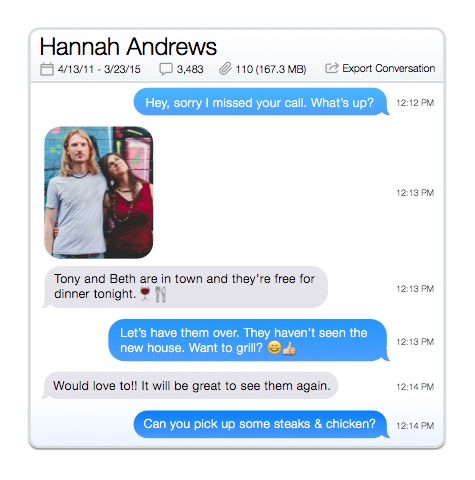
Transfer Playlists from iPod to iTunesWith Phone to Mac you can almost instantly copy a playlist from anyone's iPod or iPhone. Simply select the playlist's tracks and then click transfer. Phone to Mac then recreates the playlist copying music when needed and avoiding duplicates if the track is already in iTunes. Search iPod, iPad and iPhone for MusicGot 10,000 tracks on your iPod but only want to copy an album? Phone to Mac lets you quickly find the tracks you're looking for with a search bar and filter option. Recover Pictures and PhotosPhone to Mac even offers picture transfer and recovery for the iPhone and iPod Touch! Preview thumbnails, drag and drop individual images or copy entire albums with the touch of a button! Address BookLooking for a way to transfer contacts from an iPhone, iPad or iPod Touch to your PC? Simply drag contacts to the Desktop or drop them directly into Outlook. SMS and NotesNeed a specific text message or note from your iPhone, iPad or iPod Touch on your computer? Copy and manage your SMS and notes all on your PC. |
Crash Recovery SolutionIf your computer crashed or you just bought a new one, Phone to Mac is the ideal solution to move your music back on to the computer. Simply download, install and click auto-transfer and everything will be back the way it was before. Prevent DuplicatesBefore you've even connected your iPod or iPhone, Phone to Mac knows which tracks are in iTunes and (unless you tell it otherwise), it's not going to copy a duplicate into iTunes. Drag and Drop to ComputerThe quickest way to get files directly from your iPod, iPad or iPhone is the highly intuitive drag and drop feature which we've built in. This feature lets you quickly copy songs, videos, images and more! Call History, Web HistoryBrowse and sort through your Call and Web history. Access, browse and save your Safari bookmarks. CalendarKeep those important dates by browsing through your Calendar. |
Play Music & Video without iTunesWant to play music without using iTunes? Phone to Mac lets you listen to music and movies on any iPod without having to transfer it into your iTunes library. Automatic UpgradesWith constant iPod and iPhone upgrades, Phone to Mac is updated quite frequently to to keep up with Apple and also to add new features and bug fixes.. With its built in update framework, Phone to Mac lets you know when an update is available and makes installing the updates nearly seamless . Copy VoicemailsListen to that important voicemail message directly on your computer. Then backup and store your voicemails on your PC. Backup BrowserBrowse thru your iTunes backups |
Computer Requirements:
|
iPod Compatibility: Works with all, iPods, iPhones and iPads including:
|
![]() |
![]() |
![]() |
| Visit our support page by clicking here. Or e-mail us at [email protected] and we'll get back to you shortly. We check our e-mail 7 days a week, so you can expect a response within 24 hours (but many times much faster). | If you've got an iPod and iTunes, then you're good to go! | If you've got a PC, you'll probably be interested in Phone to PC! It's iPod recovery tool for Windows. |


